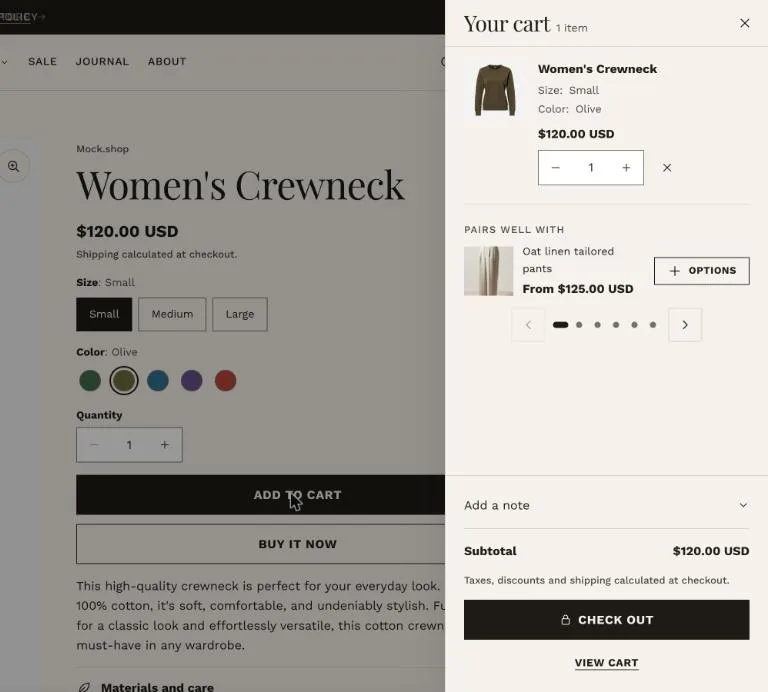
A cart drawer, pop-up notification or cart page, with a free shipping bar and recommendations.
Cart type
Drawer
A side panel slides in with the cart and checkout button.
Pop-up notification
A small confirmation with links to the cart and checkout.
Page
Visitors go straight to the cart page.
The Drawer cart type with a recommendation.
Cart contents
Visitors can change quantities, remove lines, add an order note and enter a discount code. Set a Free shipping threshold in your store currency to show a progress bar; it shows only while the cart is in that currency.
Cart drawer
Show product recommendations adds suggestions for the first item in the cart, and Collection for empty cart shows up to four products when the cart is empty.
Checkout, gift cards and subscriptions
Checkout is styled in Settings → Checkout, not in the theme. Gift card products get a recipient form when Show gift card recipient form is on, and products with selling plans show a one-time or subscription choice above the buy buttons.