Pick a menu and a desktop layout, then decide how the header behaves as visitors scroll.
Desktop layout
Logo start, menu center
Logo left, menu centred, icons right.
Logo start, menu inline
Logo left with the menu beside it.
Logo center, menu below
Centred logo with a menu row underneath.
Split menu around logo
Menu links either side of a centred logo.
Menu in drawer
A menu button on desktop too.
From top: Logo start, menu center (Tesserae); Logo start, menu inline (Cairn); Logo center, menu below (Harvest).
Sticky header
None, Always, or On scroll up: the header hides as visitors scroll down and returns when they scroll up.
Transparent header on the home page
The header overlays the first section until visitors scroll. Frosted band or Gradient fade keep the menu readable on any image; Fully transparent suits a hero with a plain area. You can set a separate transparent header logo and text colour.
Selectors and dropdown promo
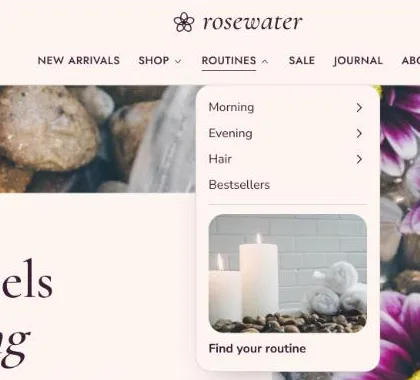
Country/region and language selectors show only when your store sells in more than one market or language. Dropdown promo adds an image, heading and link at the bottom of ordinary dropdown menus.
A dropdown with flyout sub-menus and a dropdown promo (Rosewater).